Best ARK: Survival Evolved Server Hosting Providers in 2025
So what if you want to play in multiplayer mode but in a more controlled environment? What if you want to play Ark Survival Evolved with your friends and no one else? Well, the best course of action, in that case, would be to set up or rent a private server where you have full control over who you play the game with. Both these options will achieve the desired result, but each one has its pros and cons.
Top ARK: Survival Evolved Server Hosting Companies
We considered several things when compiling this list, including price, features, support, and more. Although we decided to create a ranked list, it’s worth noting that each of these providers can definitely do a great job at hosting your Ark Survival Evolved private server. At the end of the day, every player has different needs so our fifth favorite provider could very well be a lot of people’s number one choice. Don’t hesitate to check them all out and pick the one that’s most suitable for you.
Here is a compressed view of the best ARK: Survival Evolved hosting providers:
- DatHost – Customizable, easy-to-manage servers ensuring optimal performance for esports and gaming professionals.
- Host Havoc – Unparalleled uptime and exceptional support, ideal for reliable, high-performance hosting needs.
- Gportal – Global network of high-performance servers, providing a seamless hosting experience across continents.
- SurvivalServers – Specialized, high-performance servers that bring survival game experiences to life with unmatched stability.
- Shockbyte – Empowers gaming with robust servers, exceptional uptime, and scalability for high-demand multiplayer games.
- ScalaCube – User-friendly interface perfect for robust, hassle-free server management in gaming.
- ServerBlend – Combines flexibility with top-tier performance, offering custom solutions for various applications.
- GTXGaming – Cutting-edge hardware with a bespoke control panel tailored for high-speed, lag-free gaming experiences.
1. DatHost
DatHost is a premium game server hosting provider offering specialized services for ARK: Survival Evolved. With a focus on hassle-free hosting, DatHost ensures that players can concentrate on the game rather than server management. Known for its user-friendly interface and robust server performance, DatHost is a popular choice among ARK players for its reliable and efficient hosting solutions.
Update 2025: DatHost continues to lead as the best ARK server hosting provider with unbeatable prices and performance. An excellent pick no matter if you’re just starting your first server or migrating from another provider.
Features
- Crossplay Support: DatHost supports Steam and Epic Games, enabling cross-platform play.
- Easy-to-Use Settings Manager: Over 200 aspects of the ARK server can be easily tweaked.
- One-Click Mod Installation: Simplifies the process of installing both Steam Workshop mods and ArkAPI plugins.
- Lag-Free Performance: Servers are powered by modern CPUs and SSDs, ensuring minimal latency.
- Auto-Updates & Backups: Regular updates and daily backups keep the server up-to-date and secure.
- DDoS Protection: Servers are equipped with up to 2 Tbps capacity DDoS protection.
- Global Server Locations: High-speed servers are in 21 locations across 16 countries.
Pricing
Their service provides a comprehensive monthly package for $14.02, granting unlimited usage and flexibility in billing cycles with options for monthly, quarterly, and yearly payments, all complemented by a 7-day money-back guarantee, ensuring a risk-free trial for new users.

Support
They offer round-the-clock customer support for immediate issue resolution, a user-friendly control panel for effortless management of the ARK server, and a comprehensive help center equipped with resources and guides to tackle common queries and problems.
Pros and cons
Pros
- Cross-platform support
- User-friendly interface
- Neat performance
- Global server reach
- Good support and backup
Cons
- Slightly higher cost
- Update delays
2. Host Havoc
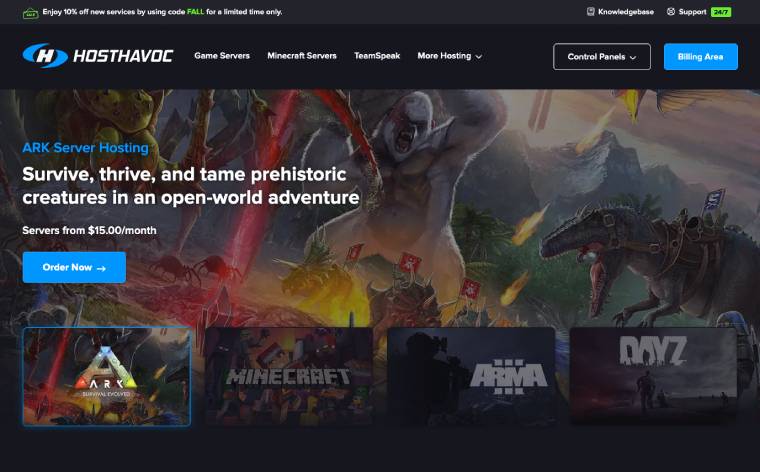
A well-known game hosting provider that was established in 2014. This provider expertly blends cost-effectiveness with top-tier performance, offering all the key features you need for an immersive Ark Survival Evolved experience.
Features
- High-Performance Hardware: Host Havoc prides itself on owning and operating its own high-end hardware, ensuring optimal performance. This includes Xeon and Ryzen CPUs, DDR4 & DDR5 Memory, and NVMe SSD Drives with up to 10Gbps Uplinks.
- Automatic ARK Clustering: For gamers with multiple ARK servers, they offer instant clustering at no additional cost, even across different locations.
- Workshop Mod Integration: The platform supports easy installation and management of ARK server’s Steam Workshop mods, including Workshop Collections, through a user-friendly interface.
- Full FTP Access: For those who prefer self-management, Host Havoc provides FTP access and a file manager for manual backups, restores, and management of ARK API plugins.
- Support For All Mods and DLC: The hosting service supports all maps, mods, and DLC for ARK, including popular ones like Extinction, Genesis, Ragnarok, and Fjordur.
Pricing
The pricing is competitive for this ARK server hosting provider, starting at $0.50 per slot or $15.00 per month for 30 player slots. They provide unlimited storage and anti-DDoS protection. The pricing varies based on the number of player slots and the billing cycle, with discounts available for longer commitments.
Support
Host Havoc boasts a 24/7 support system, ensuring that any issues or queries are promptly addressed. Their customer support has received positive reviews for quick and efficient service. Additionally, they offer a knowledge base for common queries and issues.
Pros and cons
Pros
- Reliable performance
- Mod and DLC support
- User-friendly interface
- Flexible pricing
- Effective customer support
Cons
- Region limitations
- Complex features setup for beginners
3. G-Portal
G-Portal is a renowned hosting provider for various games, including the famous ARK: Survival Evolved. Known for its reliability and performance, G-Portal offers features that cater to novice and experienced server managers. With a focus on delivering a high-quality gaming experience, G-Portal stands out as a top choice for hosting ARK: Survival Evolved servers.
Features
- All DLCs Included: G-Portal supports all ARK Genesis, Crystal Isle, and Lost Island DLCs, ensuring players have access to the full range of ARK content.
- Slots Range: Offers server slots ranging from 10 to 64, accommodating different group sizes and preferences.
- Steam Workshop Integration: Integrated workshop for mods, allowing easy mod management and customization.
- Licensed ARK Servers: Provides licensed ARK: Survival Evolved steam servers for a legitimate and stable gaming experience.
- Unlimited Mod Storage: Offers unlimited storage for your favorite mods, ensuring you can enhance your gameplay as desired.
- DDoS Protection: Features robust DDoS protection with Bulwark and Corero for a secure and uninterrupted gaming experience.
- Cross-Travel: allows players to travel between multiple servers for a more expansive experience.
Pricing
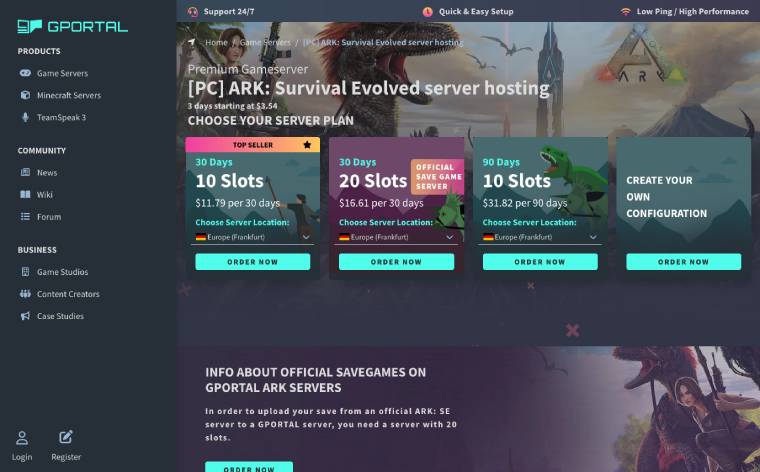
The journey begins with an enticing Starting Price, where for a mere $3.54, players can embark on a 3-day gaming escapade, a perfect, budget-friendly pick for short-term adventures. For those planning a month-long quest, the 30-Day Plan is $14.00, offering 10 slots for a close-knit gaming circle. The 20 Slots Plan, priced at $20.50 for 30 days, steps up the game, accommodating larger groups seeking more expansive virtual battlegrounds. The 90 Days Plan is a steadfast ally for marathon gamers, providing 10 slots for a solid 90 days at $37.80, ideal for extended campaigns. And for the gaming connoisseurs, a custom configuration option awaits, offering the freedom to ask server specifications to precise gaming desires, ensuring that every virtual world is as unique as its creator wants.
Support
The 24/7 support ensures that any issue, whether small or complex, is addressed promptly, offering peace of mind at all hours. A user-friendly ticket system complements this, designed for efficient and effective resolution of problems, ensuring a quick and hassle-free experience. For a more personalized touch, dedicated hotlines for both EU and US customers stand ready, offering personalized assistance.
Pros and cons
Pros
- Full-range DLC support
- Flexible slot options
- DDoS protection
- Steam Workshop integration
- 24/7 customer support
Cons
- Limited free trial period
- Limited physical server locations
4. Survival Servers
Survival Servers stands out as a specialized hosting provider for ARK: Survival Evolved, offering tailored server hosting solutions. They are known for their custom control panel and a wide range of features that cater to both novice and experienced server administrators.
Features
- Instant Setup: Servers are set up instantly upon rental.
- Full FTP Access: Complete access for server management.
- Automated/Custom Server Restarts: Ensures server stability and performance.
- Latest Versions of Supported Mods: Keeps the server up-to-date with the latest game mods.
- Steam Workshop Maps and Mods: Easy integration of Steam Workshop content.
- Custom ARK Server Config Manager Tool: Allows for detailed server customization.
- DDoS Protection: Servers are safeguarded against DDoS attacks.
- Global Network: Multiple hosting locations with DDoS protection, including Seattle, Los Angeles, Dallas, New York, France, Germany, and Singapore.

Pricing
This hosting server comes standard with ample RAM for the Genesis 2 map and is enhanced by super-fast NVMe SSD Drives for peak game performance. The hosting plan offers a range of monthly player slots, starting at $24 for 10 slots and going up to $95.41 for 255 slots. For larger requirements, customers have the option to run clusters across 15 servers for a total of $739.50. Additionally, there are significant savings available for longer commitments: 10% off for a three-month advance payment, 15% for six months, and a substantial 25% discount for a full year’s subscription. It’s important to note, however, that currently, there is no money-back guarantee offered with these plans.
Support
Survival Servers boasts a dedicated support team accessible via help desk, email, and community forum. They also provide a comprehensive FAQ section and a wiki for self-help.
Pros and cons
Pros
- Instant server setup
- Extensive mod and map support
- Robust DDoS protection
- Global server locations
- Custom control panel
Cons
- No money-back guarantee
5. Shockbyte
Shockbyte is a prominent hosting provider for most games. Since its inception in 2013, Shockbyte has established a strong reputation in the gaming server community, hosting over half a million servers and serving hundreds of thousands of customers. They offer various services designed to enhance the gaming experience for ARK: Survival Evolved players.
Features
- Modding Support: Shockbyte provides automatic Steam Workshop mod installation and modding support.
- Clustering Support: Enables CrossARK Transferring support.
- Crossplay Support: Allows for a broader player base.
- Expansions Support: Supports server-compatible mods, custom maps, expansion packs, DLC maps, and special holiday events.
- Automatic Updates and Backups: Ensures the server is always up-to-date and secure.
- 24/7 Support and DDoS Protection: Offers constant assistance and protection for servers.
- Instant Setup and 100% Uptime: Guarantees quick server activation and reliable uptime.
- Global Locations and Full FTP Access: Provides flexibility in server management and location choices.
Pricing
Every byte and player slot counts and Shockbyte has 3 plans to sort that out. The Raptor Plan, a beginner’s haven at $14.99 per month, offers robust 30-player slots coupled with 10GB of memory, perfect for close-knit gaming communities. Stepping up the game, the Sabertooth Plan, hailed as the most popular choice is priced at $29.99 per month, boasting 70 player slots and a hefty 12GB of memory, catering to more expansive realms and adventures. For the gaming elite, the Rex Plan emerges as a real server of a fortress with pricing on request, offering an impressive 125+ player slots and a powerful 16GB+ of memory.

Support
Shockbyte offers 24/7 customer support to assist with any server hosting questions. They provide a range of tutorials and a knowledge base for managing game servers. Additionally, they offer a free FTP file migration service for those migrating from another ARK: Survival Evolved server host.
Pros and cons
Pros
- Extensive modding support
- Robust clustering support
- Competitive pricing
- Strong community reputation
- Great customer support
Cons
- Limited customization in lower plans
- Reliance on external mod sources
6. ScalaCube
Known for its efficient and reliable services, ScalaCube offers a comprehensive solution for gamers and server administrators looking to host their own ARK servers.
Features
- Instant Server Setup: ScalaCube ensures a quick and hassle-free server setup process.
- 24/7 Uptime: The hosting service guarantees maximum server availability.
- Full FTP Access: Users have complete file transfer protocol access for server management.
- DDoS Protection: Servers are protected against Distributed Denial of Service attacks.
- SSD Drives: Enhanced server performance with solid-state drives.
- Free Domain: ScalaCube provides a free domain for server hosting.
- Steam Workshop Mods: Supports mods from Steam Workshop for both Steam PC and Epic Games versions.
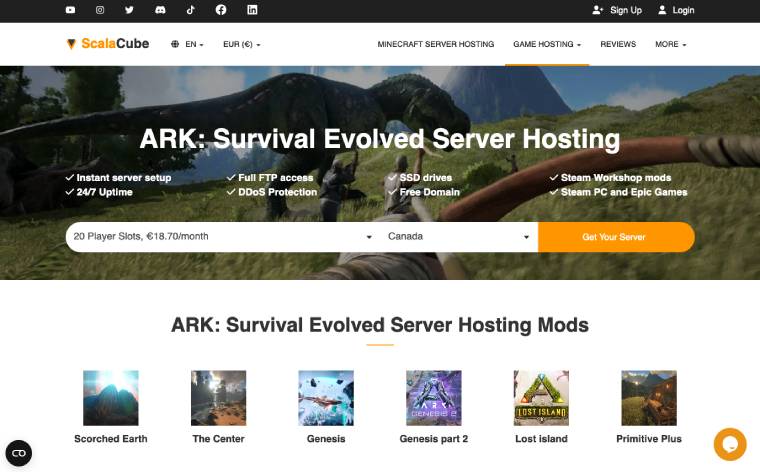
- Global Server Locations: Servers are available worldwide, including Canada, France, the United Kingdom, Australia, Singapore, the United States, Germany, Poland, and India.
Pricing
ScalaCube offers a starting price of $19 per month for 20 player slots. The highest tier allows hosting up to 120 players for $48 a month. This competitive pricing makes ScalaCube an attractive option for various server sizes and budgets.
Support
They offer a comprehensive help system and customer support team ready to assist with any issues. The control panel allows for easy administration, including player privilege assignment, server option changes, and file management.
Pros and cons
Pros
- Quick and easy server setup
- Great DDoS protection
- Global server locations
- Competitive pricing
- User-friendly control panel
Cons
- Customization may require technical knowledge
- Limited information on long-term server stability
7. ServerBlend
ServerBlend was established back in 2014 and managed to make a name for itself over the years thanks to its very affordable prices. Sometimes low prices translate to bad performance but that’s definitely not the case here as ServerBlend hosts all its servers on fairly powerful machines.
Features:
- Global Server Locations: Servers are available in various locations, including Montreal, Dallas, New York City, Vint Hill, Hillsboro, Miami, Los Angeles, Dronten, Roubaix, London, Frankfurt, Warsaw, Sydney, and more.
- High Performance: The servers are powered by Intel Xeon processors with fast ECC RAM and SSD or NVMe Storage with RAID.
- One-Click ARK Server API/Plugins: Simplifies the process of adding mods and plugins.
- DDoS Protection: Ensures server stability and uptime.
- Customized Control Panel: Offers a user-friendly interface for server management.
- Workshop Mod Support: Easy installation and update of workshop mods.
- Cross-Ark Chat Bot: Allows chat between clustered servers and Discord.
Pricing
Renting an Ark Survival Evolved server from ServerBlend is designed to accommodate a range of needs. The standard plan starts at $18 per month, suitable for most users, while the premium plan starts at $30 per month, offering the fastest hardware and fewer clients per node for enhanced performance.

Support
ServerBlend provides expert technical support available through ticket, email, phone, and Skype. They also offer a 7-day money-back guarantee for customer satisfaction.
Pros and cons
Pros
- High-performance hardware
- Wide range of server locations
- Easy mod installation
- Flexible pricing
Cons
- Expensive premium plans
- May require technical knowledge
8. GTX Gaming
Dive into the prehistoric world of ARK: Survival Evolved with GTX Gaming, the hosting provider that has been at the forefront of server hosting since the game’s inception. With a tailored approach for ARK enthusiasts, it offers a robust platform that’s not just about running the game—it’s about enhancing the overall experience with a suite of powerful features that simplify server management and elevate gameplay.
Features
- High Clock CPU: To ensure smooth and lag-free gameplay, it provides servers equipped with high-clock CPUs that can handle the demanding nature of ARK.
- Instant Setup: Get your server up and running quickly with GTX Gaming’s instant setup feature.
- Beyond API Plugin Support: Extend the capabilities of your server with API plugin support, providing more flexibility and customization options.
- Cross Travel: Link multiple ARK servers together for a seamless cross-server travel experience.
- Procedural Map & Steam Workshop: Generate random maps with GTX Gaming’s tool and download workshop items easily for an enriched game environment.

Pricing
In terms of scalability, player slots range from 10 to 250, with prices varying from £9.99 (approximately $14.80) to £63.99 (approximately $88.40). All Ark dedicated server plans include a baseline offering of 5GB of RAM, an SSD drive, a choice of server location (some locations may incur an additional fee), and a 3.8GHz CPU. For those needing more power, additional memory options range from 8GB to 32GB, with prices between £2.99 (approximately $4) and £23.99 (approximately $33.10). Notably, the Genesis 2 map, while requiring a minimum of 14GB of RAM, performs optimally with 16GB. For those seeking further enhancements, an NVMe M2 Enterprise drive upgrade is available for £4.99 (approximately $7).
To offer more value, GTX Gaming provides discounts: 5% off for three months paid upfront, 10% for six months, and 15% for an annual payment. Additionally, for those uncertain about their purchase, there is a comforting 24-hour refund policy.
Support
The service provides unparalleled 24/7 support, ensuring assistance is always available, even during public holidays and weekends, for its users. This commitment to accessibility is complemented by robust DDoS protection in every data center, fortified with enterprise-level security measures to keep servers consistently online and secure. Additionally, the service’s worldwide coverage extends across various global locations, allowing users to select the server nearest to them.
Pros and cons
Pros
- Comprehensive Support
- Global Server Locations
- Advanced Features
- Enhanced Performance
- Ease of Use
Cons
- Platform Limitation
- No Specific Pricing Information
- Cluster Support Complexity
Final Thoughts
We hope our Ark Survival Evolved hosting providers guide will serve you well regardless of whether you’re an experienced user or just now thinking about setting up your first server. If you’re willing to invest a bit of time and effort you can definitely host a server without having to rely on the companies mentioned in this article. However, renting a server has plenty of advantages and is generally not very expensive so we recommend considering this option instead.
DatHost was our number 1 pick because they are one of the few companies that specialize exclusively on Ark Survival Evolved and its agents are very knowledgeable when it comes to all aspects related to the game. However, they have their pros and cons just like any other company.
If you’re looking for a provider with good location coverage, GPortal is clearly your best pick. Meanwhile, you’ll be hard-pressed to find a better option than HostHavoc if you’re mainly interested in performance.
Each of the companies we covered in this article targets a specific type of audience so at the end of the day you should go with the provider that caters to your particular needs.
If you want to take your gaming a step further and make some money during the process, you can always look for a beta tester job on Jooble. Since you already have the knowledge to create a private server and test all of Ark Survival Evolved features it should be easy for you to apply to most of the postings.
